
Choose Kling 3.0
For a short clip or prompt-led scene, consider Video 3.0. For reference-led work or a custom multi-shot storyboard, look at the separate Video 3.0 Omni model. You do not need 4.0 merely to get 4K output.
Model selection guide
Kling 4.0 promises longer native clips, more keyframes and richer references. Kling 3.0 remains a capable choice for shorter videos, native audio and reference-led work. This guide separates announced model specifications from features you can use on this site today.
“Kling 3.0” can mean the model family. Kling Video 3.0 and Kling Video 3.0 Omni are distinct models within that family; the Omni version emphasizes reference-led generation and custom multi-shot storyboards.
Last reviewed: · Based on official Kling AI and Kuaishou sources, not a same-prompt hands-on test of both models.
For a short clip or prompt-led scene, consider Video 3.0. For reference-led work or a custom multi-shot storyboard, look at the separate Video 3.0 Omni model. You do not need 4.0 merely to get 4K output.
For a longer single generation, several planned visual beats, or a larger mix of reference assets. The full model is scheduled for an October 2026 rollout.
For faster generation if you have early access on Kling AI. Flash is a separate variant, with up to 20 seconds and 720p output, not the full 4.0 specification.
Kling AI says the full Kling 4.0 model is scheduled to open in October 2026. Kling 4.0 Flash began limited early access on September 28. Announced model capabilities may not all be available during rollout. In particular, Kling AI labels 10-bit HDR as coming soon.
For the dated announcement and early access steps, see our Kling 4.0 release date timeline.
| Model | Kling AI announcement | Kling40.app availability |
|---|---|---|
| Full Kling 4.0 | Scheduled for October 2026 rollout | Planned; awaiting access |
| Kling 4.0 Flash | Limited access from September 28 | Gradually rolling out |
| Video 3.0 | Part of the launched 3.0 family | Configured in the generator; access and settings depend on account and mode |
| Video 3.0 Omni | Separate reference-led model in the 3.0 family | Configured in the generator; access and settings depend on account and mode |
Site status reflects current generator configuration and does not guarantee a task will succeed. Check the selected mode, account access and displayed settings before submitting.
The left column summarizes the Kling 3.0 video series, not one identical model. Video 3.0 and Video 3.0 Omni differ, and reference-led editing refers specifically to Omni. Figures for the announced full 4.0 model can differ by creation mode, account access and reference type.
| Feature | Kling 3.0 series | Full Kling 4.0 | Why it matters |
|---|---|---|---|
| Native video duration3.0 series | 3–15 seconds | 3–30 seconds | More room for a complete sequence in one generation. |
| Timeline control3.0 series | Start and end frames | Up to 10 keyframe images | Guide several visual moments between the opening and ending. |
| Resolution3.0 series | Up to 4K | Up to 4K | 4K alone is not a reason to switch generations. |
| Audio3.0 series | Native audio; single-channel output | Two-channel stereo and improved lip-sync | Relevant when dialogue and spatial sound matter. |
| Reference assetsEspecially Video 3.0 Omni | Up to 7 images or subjects without video; lower combined limit with video | Up to 15 combined assets, subject to per-type limits | Useful when several characters, products or motion references must align. |
| Video editingVideo 3.0 Omni | Reference-based workflows in 3.0 Omni | More targeted multimodal editing | Editing is an expansion, not an entirely new ability. |
| 10-bit HDR3.0 series | 8-bit SDR | Announced for 1080p and 4K; coming soon | Do not plan a current production around HDR availability. |
Kuaishou announced both within the Kling 3.0 family. Video 3.0 focuses on prompt-led production with native audio and intelligent multi-shot storytelling. Video 3.0 Omni adds advanced reference-led generation and a custom multi-shot storyboard, including control over shot duration, framing, perspective and camera movement. A feature described for the series should not automatically be read as an identical control in both model interfaces.
These are planning examples derived from provider specifications. They explain when a feature could change your workflow; they are not results from matched generations.
The brief: Show one product, a hand picking it up and a final close-up in one continuous shot.
With 3.0Video 3.0 can fit this within its announced 15-second ceiling. Plan the subject, action and camera move in one prompt; use Omni if a reference must preserve the exact product.
With full 4.0The full 4.0 model also covers the brief, but its extra duration and keyframes solve no obvious problem for this simple shot.
Selection: Start with the available 3.0 workflow. Move to 4.0 only if the brief grows beyond one shot or needs more intermediate visual control.
The brief: Open on the product, show a person using it, then end with a branded close-up.
With 3.0The 15-second native limit means planning separate clips or simplifying the story. Check continuity at the cut: product shape, wardrobe, lighting and screen direction.
With full 4.0The announced 30-second limit and up to 10 keyframes could place the opening, use moment and close-up within one planned generation. Review whether each beat occurs at the intended time.
Selection: 4.0 is the more relevant specification, but wait for access and test its timing before promising a deliverable in one generation.
The brief: Keep a face, outfit and product consistent while following a separate camera-motion reference.
With 3.0Video 3.0 Omni is the relevant 3.0 variant because it supports reference-led creation. Count the images, subjects and any video reference before choosing a mode; adding video changes the combined limit.
With full 4.0The announced larger combined reference budget may accommodate more source assets. Give each asset one job and stay within the per-type and overall limits.
Selection: Use Omni when its reference budget covers the brief. Consider 4.0 for a genuinely larger set of constraints, not for a single portrait and one product image.
This is a Kling40.app 3.0 Omni image-to-video case, not a 4.0 comparison test. Its input, prompt, output and known settings are documented on the Kling 3.0 Omni page.
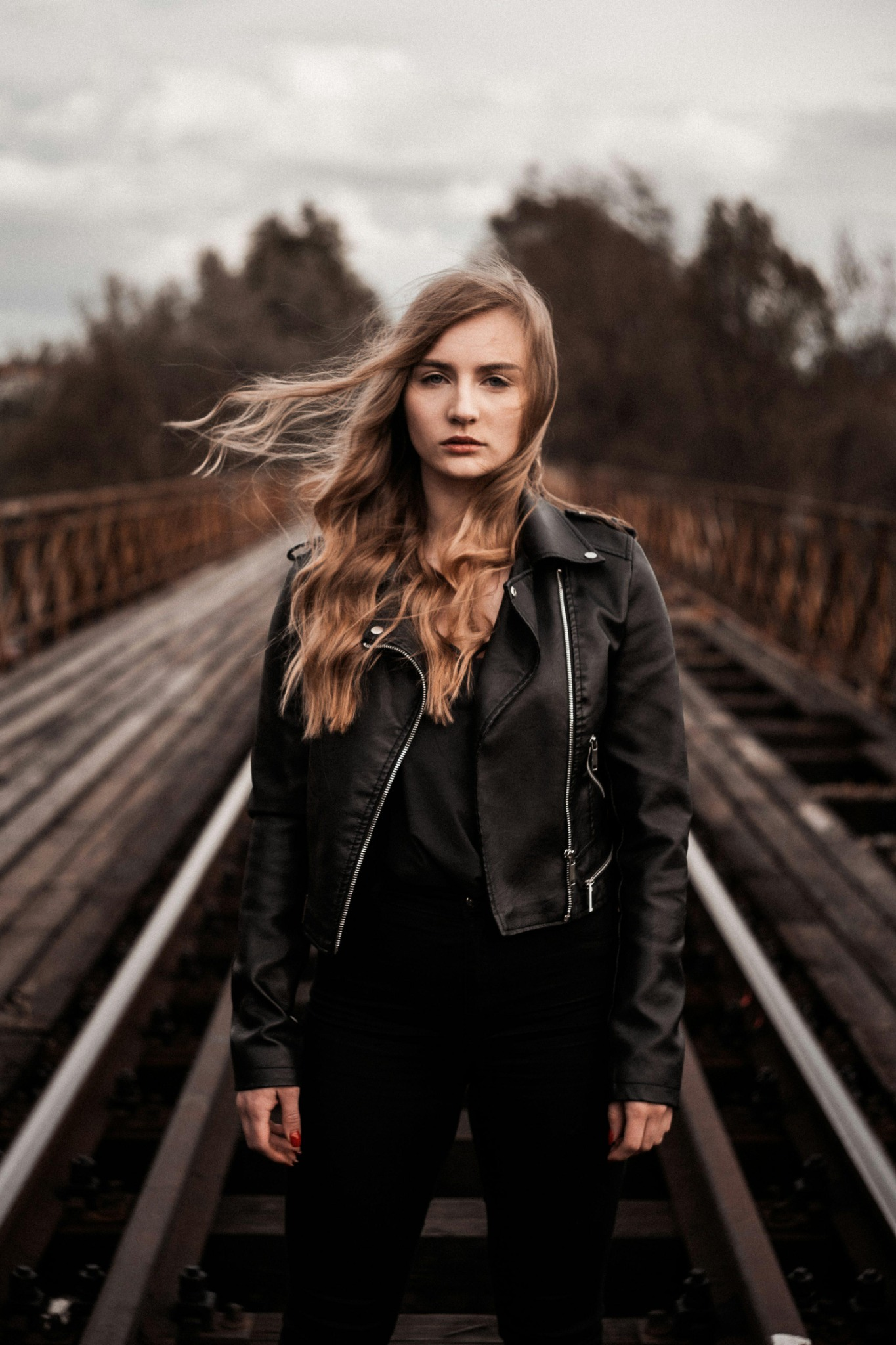
The prompt asks for one continuous shot, a step toward camera, wind in the subject’s hair and a camera push-in. It also asks the model to preserve the face, clothing and setting. Those constraints make this example useful for inspecting motion and identity within one short shot.
The blonde woman in the reference image suddenly takes one confident step toward the camera as a powerful gust of wind sweeps her long hair dramatically backward. Her black leather jacket moves naturally in the wind. She maintains intense eye contact with the camera, her expression calm but fearless. The camera performs a fast, smooth dolly-in with subtle handheld cinematic energy, creating a dramatic sense of depth along the railway bridge. Realistic hair physics, natural body movement, sharp facial details, authentic skin texture, moody overcast lighting, premium Hollywood thriller cinematography. One continuous shot. Preserve the woman's exact facial identity, clothing, and original environment. No slow motion, no face distortion, no scene changes, no unnatural movement, no text or logos.
Reference image supplied with the example. Duration and output dimensions were read from the video file; the original generation date and audio generation setting were not supplied. The supplied video file has no audio track.
This three-second, single-shot output cannot establish how either model handles a 25-second story, multiple keyframes, stereo audio or a matched 4.0 prompt.
Explore the available Kling 3.0 Omni examples, check Kling AI pricing on this site, or return to the video generator.
Specifications and rollout status come from the model provider. Scenario recommendations are our interpretation of those specifications. We have not run matched 3.0 and 4.0 generations, so this page does not claim a tested winner in motion quality, speed or prompt accuracy.
Sources: Kling AI 4.0 vs 3.0 comparison · Kuaishou 3.0 announcement